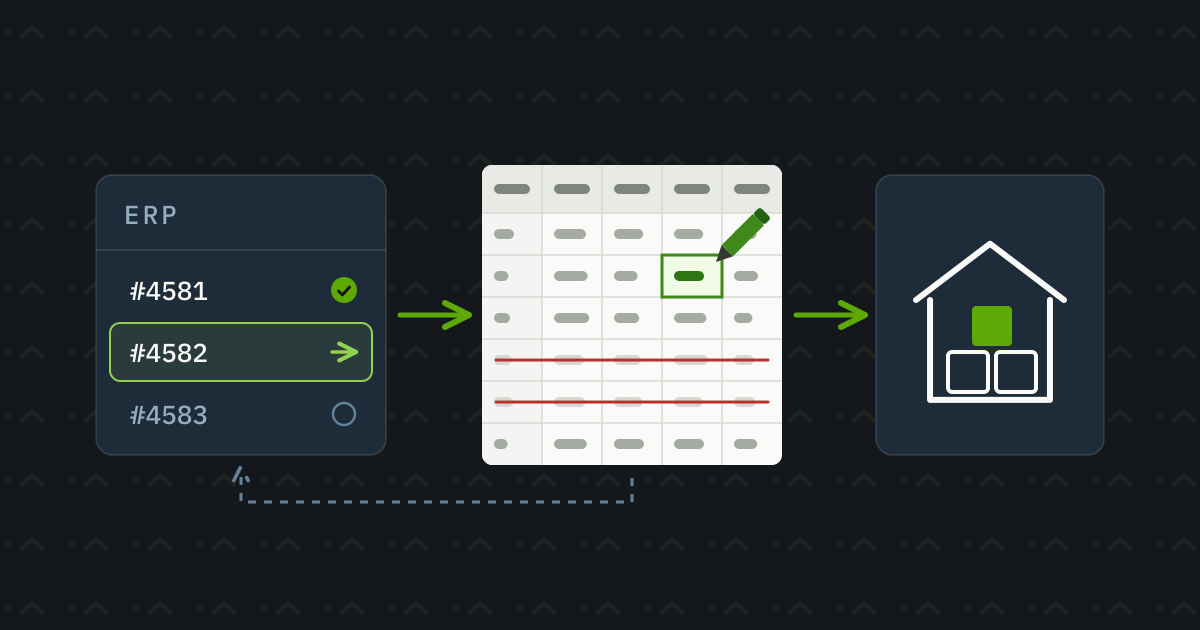
The order is already in the enterprise resource planning system, yet the warehouse still learns about it through an Excel file. An administrator downloads the data, rearranges the columns and uploads the file to the logistics partner's software. Along the way, they correct a delivery address, remove two items that cannot yet be fulfilled and finally mark what they have handed over in the original system.
From the outside, this looks like a few simple operations. But the person doing it every day knows exactly which customer needs special packaging, which status is ambiguous and when it is better to call the warehouse. Copying data is only part of their job.
This explains why manual order handover can persist even in businesses that use modern software. Before automating order processing, we also need to understand what happens between the export and the upload. Otherwise, it is easy to build a connection that moves data quickly while letting through the very problems the administrator used to catch.
Business decisions happen in Excel too
Rearranging columns is a well-defined task. If one application calls the same product identifier “Product code” and the other “Item number”, mapping them is straightforward. Similar field names can, however, hide different codes or different meanings for the same quantity.
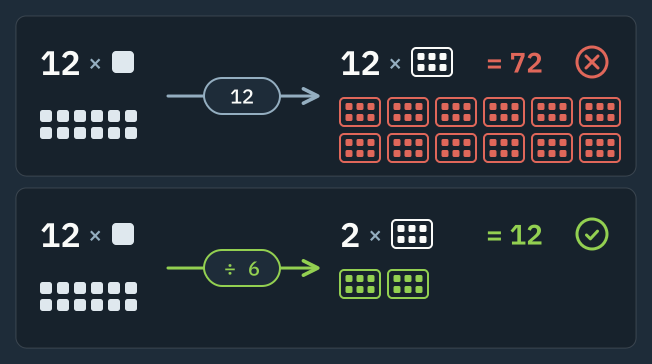
Suppose an order contains twelve units of a product, while the partner handles cartons of six. Sending “12” unchanged may be technically successful, yet instruct the warehouse to release twelve cartons. The product code must therefore be accompanied by the unit of measure and the conversion rule. Missing or outdated mappings need to be detected before the order moves on.
A manually deleted order line raises similar questions. Did the administrator remove it because there was no stock? Did the customer request a later delivery? Or must the whole order ship together, so one missing item holds everything else back? Each answer implies different processing rules.
If such corrections take place in exported files at your business, it is worth watching a few handovers with the colleague who does the work. For every change, establish the reason and where the information behind the decision comes from. A customer email? A stock report? Or an earlier verbal agreement nobody else knows about?
Some of the rules uncovered this way can move back into the ERP system. A corrected address, for example, is best recorded where the order is managed. Items approved for shipment can have their own marker. This can reduce manual work even before integration and prevent a later export from reintroducing old, incorrect data.
Some situations will still require judgement. When a customer makes an exceptional request for a partial delivery, a person may continue to approve it. Automation planning needs to identify which cases can follow fixed rules and which should wait for approval.
Sending and acceptance are separate events
The success message after a file upload can be misleading. It may simply mean the file reached the partner. Importing it can still fail on an unknown item number, or processing may start later. APIs can work this way too: a system first accepts a request, and the processing result must be queried separately. [1]
An order's status should therefore reflect what we actually know. “Awaiting handover”, “sent” and “recorded in the warehouse system” mean different things. Picking and dispatch add further states. If a single “done” flag replaces them all, customer service can easily make a promise the warehouse is not yet able to keep.
A lost connection is particularly delicate. The warehouse creates the order, but the acknowledgement never arrives. The sender sees an error and tries again. Without suitable protection, one order can become two. Idempotent processing ensures that repeating the same handover operation does not create another copy. One way to achieve this is to use a unique operation identifier and retain its processing result. [1]
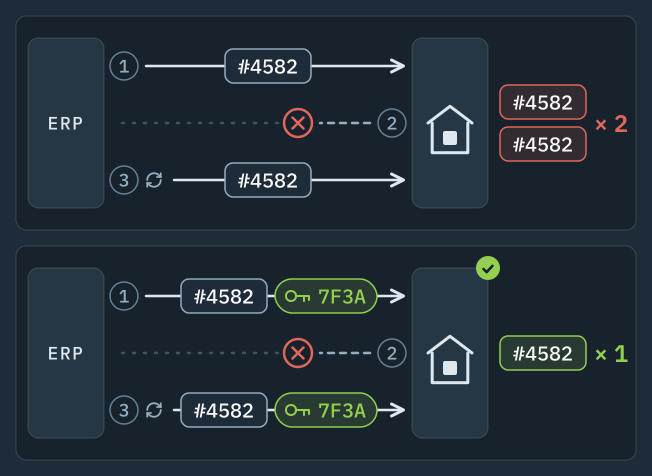
A later modification must, however, be distinguished from a repeated send. The same order number may appear in both an address correction and the retransmission of an earlier, unchanged message. Nor should an old message arriving late overwrite newer data. Agree in advance how changes are identified and how long the warehouse will accept them. An order already being picked may need a different procedure from one nobody has started working on.
Start with the systems you already have
Before development starts, ask both software vendors exactly what data exchange they support. Is there an existing connection to this partner? Can exports and imports run automatically? Are order modifications and processing results available, or can the interface only create new orders?
A successful demonstration of data being sent is not enough to make the choice. The specific software version, subscription and access permissions may determine which features are available. Configuring an existing module can be a much smaller job than writing a new connection, provided it covers the business cases you need.
File exchange can be a suitable solution
If the warehouse processes orders at fixed times each day, scheduled CSV or XML handover may be entirely reasonable. Export, validation and import can be automated, so the administrator no longer needs to open the file. This requires agreement on the file structure, mandatory fields and how the receiver reports errors. If ninety-nine orders in a hundred-order file are accepted, the missing one must be clearly identifiable. Resending the entire file without checking can create duplicates here too.
A short program may be enough for a small, stable process. Its operation still needs attention: it should have a designated place to run, traceable results and an owner. A utility occasionally launched on a colleague's computer can easily interrupt handover when they take leave or replace their machine.
When a direct connection or an existing platform makes sense
An API is an interface for machine-to-machine communication. It can send an order quickly and query the target system's status, if suitable operations are available. This is useful when the warehouse needs to start work on approved orders promptly or customer service needs up-to-date status information.
An existing automation platform can also help connect your systems. Power Automate, for example, offers ready-made connectors, and custom connectors can be built for existing APIs. [2]
Before choosing, test the actual order process: are the required fields available, can modifications be handled, and can failed handovers be tracked? Licensing, execution limits and maintenance costs are as much a part of the decision as the initial configuration.
If the trading partner uses EDI, it makes sense to align with it. EDI uses standard business messages; GS1 XML, for example, defines messages for orders, modifications, acknowledgements and deliveries. The partners must still agree on their content and use. [3] Handover schedules also need agreement so orders reach the warehouse in time.
If only the application's screen is accessible, user-interface automation, also known as RPA, may be an option. The robot fills in fields and starts operations much as a person would. Recognising screen elements depends on the interface's structure, however, and changing elements may require special configuration. [4] This means maintenance must include checks after software updates. It can work in a stable environment, but its total cost should not be judged by how quickly it can be set up.
Custom development is justified when existing options do not cover an essential process or would be disproportionately cumbersome to maintain. That may mean a single missing connection. Replacing the entire ERP system is a separate decision, with different costs and migration work.
The need for artificial intelligence should also be assessed from the input. Moving already structured order fields generally needs only a solution following fixed rules. If the data must first be extracted from a scanned purchase order, that is a separate task with its own validation needs. The two steps should be kept distinct.
An incorrect order must not disappear from the process
A temporarily unavailable partner application and an unknown item number call for different interventions. Delayed retries, limited in number, may help with the first. Sending the same incorrect data repeatedly will not fix the second. Microsoft's retry guidance likewise distinguishes transient faults from those unlikely to be resolved by retrying. [5]
Administrators need feedback they can act on. Instead of “processing error”, for example, tell them that the third line of order 4582 has no matching warehouse item number. It should also be clear who is handling the case and where handover can resume once it is corrected.
In a partial failure, whether the other items can proceed is a business decision. One partner allows partial delivery; another accepts only complete orders. Error handling must honour that rule too. A technically convenient solution must not override the agreement with the customer.
Orders that produced no error message because they never reached the sending stage must also be found. Regular reconciliation of orders approved for handover against those acknowledged by the partner can do this. A missing acknowledgement should create a visible task before the customer starts asking about their parcel.
Permissions should fit the task. An order handover connection should not have general administrator access simply because it is easier to configure. In tickets and logs, the order identifier and reason for failure usually help most. Copying the entire customer record can expose personal data to people who do not need it.
How much work can actually be saved?
Measuring your own process tells you more than a general industry percentage. Record active data-transfer work, waiting time and subsequent corrections separately. An order waiting two hours for the next upload represents two hours of delay, but not necessarily two working hours.
Consider an illustrative calculation. Sixty orders a day, an average of three minutes of manual work per order and twenty working days mean sixty working hours a month for handover. Suppose measurement after implementation shows fifteen hours a month for checks and exception handling. The difference is forty-five hours. These are hypothetical figures, not industry data promising an expected result.
The released time can go towards customer discussions, reduce overtime or let the team handle more business without recruiting another employee. If payroll costs stay unchanged, freeing forty-five hours cannot by itself be counted as a cash saving.
On the other side, regular operation must be considered alongside implementation. This includes software fees, monitoring and changes, such as when the logistics partner introduces a new mandatory field. Fewer incorrect shipments or a later daily order cutoff may bring further business benefits, but these should only be quantified using measured data or clearly labelled assumptions.
For a small number of easily managed orders with low error costs, keeping manual handover may be an acceptable choice. If a system replacement is imminent, a smaller interim improvement may pay off. The reverse also holds: with a few high-value or time-critical orders, risk alone may justify a more reliable connection. Order volume on its own offers little guidance.
One partner is enough to test the whole process
For the first implementation, choose a well-defined process: one warehouse partner and one order type, for example. Within that scope, follow handover all the way to acknowledgement. Successfully sending the easiest orders does not reveal how the connection behaves in everyday use.
Tests also need the difficult cases that occur in practice:
- one item on an order cannot yet be released;
- the delivery address changes after sending;
- the partner accepts the order, but the response never returns;
- a file containing several orders can only be partially processed;
- after an outage, previously pending handovers need to resume.
Define the expected result for each case in advance. The system must not hand over a held item, must flag an address change that can no longer be applied, and must not create another order when sending is repeated. The administrator and warehouse partner should both take part in validation, because they can judge whether a result that looks correct in the software is usable in their work.
Before going live, automatically generated data can be compared with files prepared in the usual way. During the trial, ensure the two paths cannot both create actual warehouse instructions. For a limited production rollout, agree who watches for failures, how much delay is acceptable and when the task will be taken over manually.
Use of the manual fallback process must also be recorded. If an administrator has already handed over some orders during an outage, the restarted automation needs to know about them. Otherwise, recovery itself creates the duplicates that normal operation managed to avoid.
Measurement after implementation should show which orders still needed manual intervention and why. Compare handover times with the previous process too. The results will show whether the connection is ready to expand or whether recurring causes of failure need to be addressed first.
Daily work changes noticeably when administrators only need to return to orders that require attention. The rest reach the warehouse under the approved rules, with a visible handover result. Often, this means filling in a few missing steps between existing applications.
If daily exports and corrections are what hold order handover together at your business, discuss your current process with operandor and identify where to intervene first.
Sources
- Microsoft Azure Architecture Center: Asynchronous Request-Reply pattern. Separating acceptance from processing, tracking status and using an idempotency key.
- Microsoft Learn: Custom connectors overview. Ready-made and custom connectors, and connecting existing APIs to Power Automate.
- GS1: What kind of messages does GS1 XML EDI standard provide? Order, modification, acknowledgement and delivery messages; the role of agreements between trading partners.
- Microsoft Learn: Build a custom selector. Recognising elements in UI automation and handling dynamically changing screen elements.
- Microsoft Azure Architecture Center: Retry pattern. Transient faults, delayed and limited retries, and errors that retrying cannot fix.
Technical sources checked on 6 October 2026.